Option strikes, option analytics and stock scans from one login.
HSN Algo reads the market with written rules, and every result shows the reason behind it. You can follow why a strike, a strategy or a stock is flagged, and learn from it. It is a learning tool: it does not tell you what to trade.
Access is given by your provider. One device per login. For education only, my own view and not investment advice. I am not a SEBI-registered Research Analyst.
Every call and put is measured against one common break-even line (BEP). Bars to the right of the line are above it, bars to the left are below it. Green outline: the written rules are met. Example numbers, not live data.
Written rulesEvery rule is fixed and visible. Nothing is hidden.
Alerts on candle closeSent only after a 5-minute candle closes, never on a flicker.
The reason, every timeEach result shows which rule passed and which failed.
Education onlyNo buy or sell calls. It never places an order.
What you get with your login
One sign-in opens the tools on your plan. Each plan adds to the one before. Your provider decides which tools you have.
HSN Strike Scanner
The base plan. A live read of the NIFTY ATM strikes and the ones around it.
Live NIFTY strike analysis, with the reason behind every rule (nothing hidden)
Pop-up, sound and Telegram alerts, sent only after a 5-minute candle closes
Reversal watch and sideways warnings, so you know when the setup is weak
Option chain view with the previous-day levels, BEP and open for every strike
Daily report of every strike that met the rules, with the peak and the sell side, as a CSV download
Live gold, crude oil and Brent in US dollars, USD/INR and market headlines in a strip at the top
A step-by-step walkthrough of the logic on this page, so you can learn it
Works in the browser on phone, tablet or computer
Advanced Options
Added to the scanner. An options analytics desk for NSE index options and F&O stocks.
Option chain with open interest, IV, Greeks, build-up tags and bid / ask
Strategy builder with 33 ready templates and payoff charts that include charges and margin
IV rank, gamma exposure, max pain, put-call ratio and FII / DII positioning
Optimizer that searches spreads, condors and butterflies for you
Backtester for simple option strategies on past data
Expiry-day tracker for straddle decay and open interest shifts
Futures and rollover, events calendar, calculators and ten short lessons with quizzes
A source badge on every number: live, delayed, last saved or sample
Stock Screener
Added to the scanner. Ready-made scans of NSE stocks, with analysis for every stock.
20 ready scans, 9 for swing trading and 11 for intraday, each with the stocks that pass
Market breadth and a sector heat map for Nifty 50, 100, 200, 500 and F&O
Stock page with a chart from 5-minute to 3-month candles, technical read and fundamentals
A written summary of each stock, by a free AI from calculated figures only
Compare up to four stocks side by side
Backtest that shows how each scan performed on past days
Live prices during market hours and end-of-day data after the close
Common stocks view: the stocks that appear in the most scans
What you do not get. No buy or sell calls, no tips, no guaranteed returns and no order placing. I am not a SEBI-registered adviser. The fee is for access to the website and its education only. Please consult your own financial advisor before you trade.
How each tool works
Pick a tool. Each one follows the same idea: fixed, visible rules, and the reason shown next to every result.
See which NIFTY strikes meet the rules, and why
Use it during market hours to follow how the ATM and nearby strikes behave against fixed levels, instead of watching many charts.
The feed reads the strikes. The ATM call and put and the strikes around them are read every few seconds, and everyone sees the same numbers.
Each strike is checked. Is the option above BEP, is the opposite leg below it, and do the neighbouring strikes agree?
You are told on a candle close. After each 5-minute candle closes you see the result with the reason. An alert comes only when a strike crosses the line.
One strike, rule by rule (example)
✔ Call premium is above BEP
✔ Put at the same strike is below BEP
✔ That put is below its own open
✘ Nearby puts: 2 of 4 below BEP
● Verdict: POSITIVE, 3 of 4 conditions
Analyse, build and test an option strategy in one place
Use it before and after the market to understand where open interest and volatility sit, and to see what a strategy could gain or lose.
Read the market. Open the option chain and switch between open interest, IV, Greeks, gamma exposure and max pain.
Build a strategy. Add legs from the chain or start from one of 33 templates. The payoff, breakevens, charges and margin update as you edit.
Test the idea. Run the optimizer or the backtester to see how similar setups did. Nothing is ever ordered.
Payoff of an iron condor at expiry (example)
Find stocks that pass your scans, then look closer
Use it to shortlist NSE stocks from ready scans, then read a stock's chart, figures and written summary before you decide anything yourself.
Open the dashboard. Each card is one scan and lists the stocks that pass it now, with price change and volume.
Open a stock. See the chart in the candle size you want, the technical read, the fundamentals and a written summary.
Compare and check history. Put up to four stocks side by side, or backtest a scan to see how it did on past days.
A scan card (example) 3 stocks
Stock
Change
Price
SAMPLEA
+4.9%
869.65
SAMPLEB
+3.3%
721.15
SAMPLEC
−0.3%
5,832.50
Advanced Options: analyse, build and test, on one page
Most option sites give you a chain and a calculator. Advanced Options puts the chain, volatility, positioning, strategy building, testing and charges together, with the source of every number on show. It never places an order and never tells you what to trade.
See the market
Option chain
Open interest, IV, Greeks, bid and ask, build-up tags, strike tags and the synthetic future.
Volatility
IV rank and percentile, IV smile, term structure, expected move and the volatility cone.
Gamma exposure
Gamma by strike, the gamma flip level and call and put walls.
Open interest, max pain and PCR
Where open interest sits, how it changed today, and put-call ratio by strike.
FII and DII
Participant-wise futures and options positions with 10-day trends.
Futures and rollover
Basis, open interest and rollover for indices and stocks.
Profit and loss at expiry or on a chosen date, with a volatility shift, breakevens and chance of profit.
Charges and margin
Estimated margin, brokerage and taxes inside the same view, with return on margin.
Optimizer
Searches spreads, condors and butterflies for the best chance of profit or reward to risk, after charges.
Test and learn
Backtester
Tests simple option strategies against past daily data.
Expiry-day tracker
Straddle decay, open interest shift and max pain through the day, from recorded snapshots.
Calculators
Option price and Greeks, implied volatility, charges, lot sizes and position sizing.
Ten short lessons
Plain-language options lessons, each with a quiz.
How it compares with other option sites
A general picture of two common kinds of site, not any one named website. It shows where Advanced Options puts the effort.
What you can do
Free option-chain sites
Paid analytics platforms
Advanced Options
Option chain with OI, IV and Greeks
◐
●
●
Source shown on every number: live, delayed, saved or sample
○
◐
●
Strategy builder with payoff, breakevens and Greeks
◐
●
●
33 ready templates, including calendar spreads, covered call and collar
○
◐
●
Charges and margin estimate inside the payoff view
○
◐
●
Optimizer that searches spreads, condors and butterflies
○
◐
●
IV rank, gamma exposure and max pain
◐
◐
●
FII and DII positioning
◐
◐
●
Expiry-day straddle decay tracker
○
◐
●
Backtester
○
◐
●
Rule-based strike scanner that shows the reason for each rule, on the same login
○
○
●
Places orders
No
Often, through a broker
Never, by design
● yes ◐ some, or varies ○ usually not. These are typical feature sets of each kind of site. Individual sites differ and change, so check what any site offers today before you decide.
Stock Screener: ready-made scans on NSE data
The screener runs fixed, written scans on every stock in the list you choose, and shows the stocks that pass. Open any stock for a full read: chart, technical picture, fundamentals and a written summary.
20 ready scans9 swing scans and 11 intraday scans. Each card lists the stocks that pass now, with price change, volume and a mark for the ones that are new today.
Market pageAdvancers and decliners, the share of stocks above their 50 and 200-day averages, new 52-week highs and lows, and a sector heat map.
Candles from 5 minutes to 3 monthsSwitch the stock chart between 5m, 15m, 1H, 1D, 1M and 3M candles, with moving averages and volume.
Technical readDaily and weekly trend, eight indicators, support and resistance, volume and delivery, and a 0 to 6 setup score.
FundamentalsKey ratios, growth, quarterly and annual statements, shareholding, analyst view, a 0 to 100 score and a DCF calculator.
Written summaryA short analysis written from the calculated figures. The figures come from the screener, not from the AI, and it is told never to give buy or sell advice.
Compare and backtestUp to four stocks side by side. A backtest replays a scan on every past day and reports how the stocks passing it did afterwards.
Common stocksRanks stocks by how many scans they pass, so you can see where several rules agree.
Strike Scanner in depth
The rest of this page explains the Strike Scanner step by step: the logic, the levels, how a strike is read and when you are told. Start with the animated walkthrough.
Understand the core logic, step by step
Watch the scanner's core logic in 8 short animated steps: the BEP dividing line, the strikes it looks at, the rules, the 5-minute close, the trend, Sideways and key supports, and what reaches you. Example numbers only. The scanner shows rule results only. It does not give Buy / Sell / Hold advice.
Swipe the picture sideways to see all of it.
How it works
One shared live feed is evaluated every few seconds. Every client sees the same numbers and the same reasons at the same time. Here is the whole idea, step by step: the levels, the BEP line, the four rule checks, the strength grades, the option chain table, the synthetic future, and when you are told.
1 · Every option has a set of levels
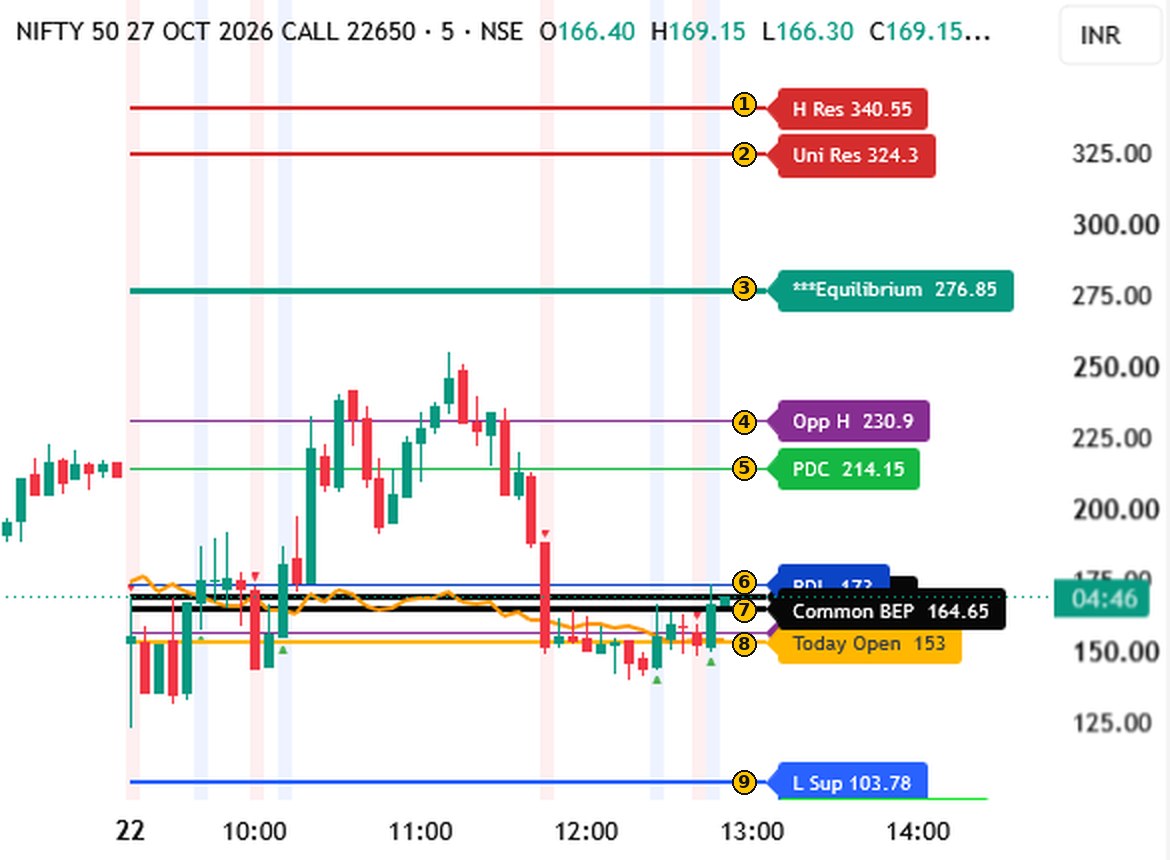
For each strike, the call and the put are plotted with the same fixed levels, taken from the previous day and from today’s first minutes. The scanner uses exactly these numbers. Below is one call option (illustration from an earlier session — the numbers change every day).
NIFTY call option, 5-minute chart, with its levels numbered.
H Res — a resistance zone built from previous-day highs.
Uni Res — the “universal” resistance: one line, common to every strike.
Equilibrium — the middle of the strike’s previous-day range.
Opp H — the opposite option’s first 5-minute candle high today.
PDC — this option’s previous-day close.
PDL — this option’s previous-day low.
Common BEP — the break-even premium. The key yardstick: the same line on every strike.
Today Open — where this option opened today.
L Sup — a support zone built from previous-day lows.
On the put chart you also see Opp L (the opposite option’s first-candle low) and Uni Sup (the universal support line) — the mirror of Opp H and Uni Res.
2 · The synthetic future and its levels
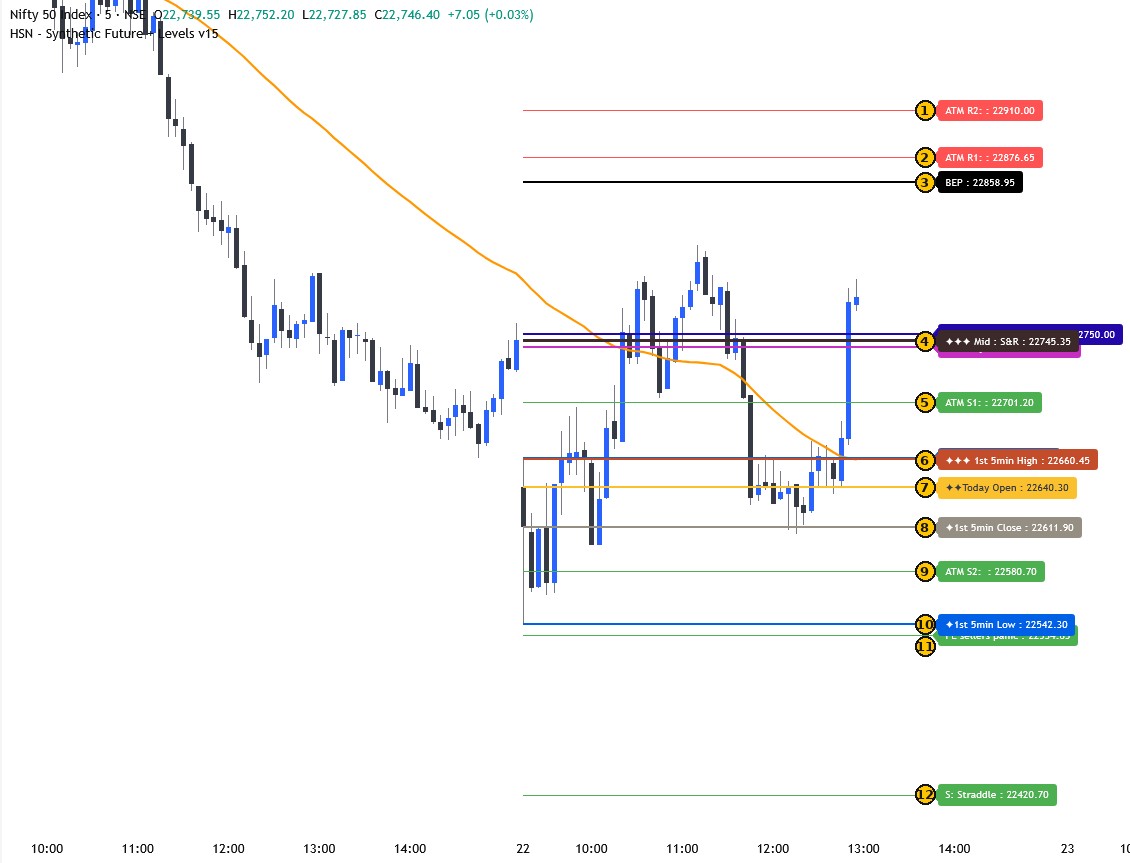
The ATM call and put are combined into an index-like number, the synthetic future, and drawn on the Nifty chart with its own levels. If it trades below its Today Open, Mid S&R and BEP the trend reads DOWNTREND; above all three, UPTREND. An alert that goes against this trend is still sent, but marked “Trend may reverse”. (Illustration from an earlier session.)
Nifty 5-minute chart with the synthetic-future levels numbered.
ATM R2 — the upper resistance reference level.
ATM R1 — the nearer resistance reference level.
BEP — the index-level break-even line.
Mid S&R — the midpoint between support and resistance.
ATM S1 — the nearer support reference level.
1st 5min High — high of today’s first 5-minute candle.
Today Open — the synthetic future’s opening value today.
1st 5min Close — close of today’s first 5-minute candle.
ATM S2 — the deeper support reference level.
1st 5min Low — low of today’s first 5-minute candle.
PE sellers panic — a reference level watched for pressure on put sellers. Its mirror is CE sellers panic.
S: Straddle — a support reference level from the straddle. R: Straddle is its mirror above.
A nine-line pre-trade checklist then lines up trend, VIX, ATM vs BEP, strikes vs their own open and the sideways clues — green passes, red fails, orange caution, blue information.
3 · BEP — the one line everything is measured against
BEP (break-even premium) is a single premium level, the same for every strike. It is calculated once for the day from the ATM options’ previous-day data, so every strike is judged against the same line.
Below BEP — premium fading
BEP
Above BEP — premium holding
How you see it on screen: the vs BEP column shows how many points an option is above (+) or below (−) BEP, and in the option chain table the LTP cell is green when at or above BEP and red when below. The common reading: a call above BEP while the put at the same strike is below it means the call side is holding while the put side is fading — that is what the rules look for. When both are on the same side of BEP, the market is range-bound and the screen says Sideways.
4 · The scanner asks three questions about each strike
1 Is the option above BEP?
For the CE side, the call must trade above Common BEP. For the PE side, the put must.
2 Is the opposite leg below BEP?
The put at the same strike should be below BEP while the call is above it (and the reverse for the PE side).
3 Do the neighbours agree?
The four nearest strikes’ opposite legs are counted. The result is shown as x/4 in the table.
The rules panel shows each of the nearest strikes as a small card, with a green ✔ or a red ✘ against every question, plus one more tick: whether the option closed above BEP at the last 5-minute candle, and a plain verdict — ALL RULES MET, VERY STRONG, STRONG, POSITIVE, NEAR or NOT MET — so you can see exactly which rule is missing.
5 · Strength colours, “since” times and Sideways
The ATM call above BEP (or above its open) while the ATM put is below it is positive. Add the puts one strike either side below it — strong positive. Add the puts two strikes either side — very strong positive. Each grade is judged two ways — against BEP and against each leg’s own Today Open — and the strike’s own leg must itself be above that line. The rows are coloured light, mid and bright green, and every grade carries a “since 14:57 (9 min)” stamp showing when it first appeared. When the ATM call and put both sit above BEP, or both below it (or both above / below their previous close), the screen says Sideways — premium decay usually dominates, so no new condition is shown.
6 · Reference levels 1 to 4
From the same list of levels, the table shows the four nearest reference levels above the option’s current price, in order — for example “PDC 214.15, Opp H 230.9, PDH 258.62, Uni Res 242.25” (information only, not targets). While an option is still below BEP, BEP itself is shown first, because that is the line it has to cross first.
7 · The option chain table
Below the rule tables is a live option chain: calls on the left, the strike in the middle, puts on the right, for every strike between today’s Nifty low and high (it scrolls). It also shows the Greek delta, open interest, the change in open interest and the put-call ratio for each strike. Illustration with example numbers:
CE
PE
PDL
PDH
PDC
Open
Chg %
Δ
OI
OI chg
LTP
Seller
Strike
Seller
LTP
OI chg
OI
Δ
Chg %
Open
PDC
PDH
PDL
173
519.15
214.15
153
-11.81 %
0.56
11.84L
+1.20L
188.85 ▴HCL
✅
22650
PCR 1.11
✅
124.9
-0.45L
13.10L
-0.44
1.13 %
156
123.5
161.95
34.55
148.4
475.65
185.65
145
-13.65 %
0.50
14.62L
-0.80L
160.3 ▴CL
✅
22700
PCR 1.16
✅
145.9
+0.63L
16.95L
-0.50
0.31 %
177.5
145.45
187.4
40.75
126.65
433.25
160
120.3
-15.44 %
0.43
9.07L
-2.10L
135.3 ▴CL
✅
22750
PCR 0.90
✅
169.55 ▴CL
+0.31L
8.12L
-0.57
0.15 %
230
169.3
215.35
48.8
PDL / PDH / PDC — the option’s previous-day low, high and close. The cell is green if the live price is at or above that level, red if below.
Open and Chg % — today’s opening price, and the change from the previous close in percent.
Δ (delta) — how much the option price moves for a one-point move in Nifty, from the broker’s Greeks. Calls are positive and puts are negative. Information only.
OI — open interest: the contracts still open at that strike, shown in lakh (L) or thousand (K).
OI chg — the change in open interest since the first reading of the day. Green means it has grown, red means it has fallen.
LTP — the live price, coloured against BEP: green at or above, red below.
▴H / C / L badge — the live price is above the opposite option’s previous-day High, Close and/or Low at the same strike. ▴HCL means above all three.
Seller ✅ / ❌ — ✅ when the option is trading below its average price for the day, ❌ when it is above.
PCR — the put-call ratio, shown under each strike: put open interest divided by call open interest. Green at 1 or above, red below 1. The overall PCR is in the title line above the table.
Gold row — the live ATM strike, the one nearest the Nifty spot.
8 · When you are told
Only after a 5-minute candle closes. The state is confirmed at 09:30, 09:35, 09:40 … so a flicker inside a candle never alerts.
Not in the first 15 minutes, not after 15:10. The screen shows “Observing” until 09:30 and “Alerts paused” from 15:10.
Only on a crossing. An alert needs three things together at a 5-minute candle close: a strike’s option closes above BEP after being at or below it on the previous candle; the opposite option at the same strike is below BEP; and the other nearby opposite strikes are below BEP too. Each crossing is one alert, so there are few of them. You get a pop-up with sound on the website and a message on Telegram. There is one extra, one-time alert: at the first candle close from 09:30 (or after a restart), a strike that is already above BEP with the same conditions in place is reported once as “already above BEP”. The only other alert is Sideways, sent once when it starts.
Against the trend. If a call alert comes while the synthetic future reads DOWNTREND (or a put alert while it reads UPTREND), it is still sent, but marked “Trend may reverse” so you can see it is against the prevailing trend.
9 · Telegram, the daily report and your login
Telegram alerts
Link your Telegram account once from the site (a one-time code). The same alerts you see on screen arrive on your phone, each ending with a short risk note.
Daily report
A log of every strike that met all conditions, with the highest price it reached afterwards in points above BEP, and how far the opposite (sell side) option fell below BEP. It is an after-the-fact record of numbers, not returns you could have earned. Download it as CSV.
Your login
One device at a time. Your access runs until the date set by the admin, and you accept the terms of use at your first login.
Expiry and range
The feed is set to one NIFTY expiry by the admin, and the strike range follows the day’s Nifty low to high automatically.
How to read a strike
The rules are written for a call-side view; the put side is the exact mirror. “Positive” here only means the written conditions are met — it is not a prediction.
CE side — conditions (x/4)
1 · Call premium is above BEP. 2 · Put at the same strike is below BEP. 3 · That put is below its own Today Open. 4 · The other nearby puts are also below BEP.
PE side — conditions (x/4)
The mirror image: put above BEP, call at the same strike below BEP and below its own open, and the nearby calls below BEP.
Strength grades
Positive: ATM call above the yardstick and ATM put below it. Strong: + the puts one strike either side below it. Very strong: + the puts two strikes either side below it. Measured against BEP and against each leg’s own Today Open.
Sideways
ATM call and ATM put both above BEP, or both below BEP — or both above / below their previous close. The banner then reads “Sideways – no new conditions”.
Reference levels 1 & 2
The nearest premium levels above the current price (previous-day low / close / high, equilibrium, universal resistance and others). BEP is shown first while a premium is still below it.
Synthetic future
The ATM call and put are combined into an index-like number. The ladder shows where it sits against Today Open, Mid S&R, BEP and the ATM levels, including “sellers panic” levels.
What the table looks like
Strike
CE
vs BEP
PE
vs BEP
PE open
Conf
Grade
22750
192.4
+21.8
120.1
−50.5
190.0
3/4
positive
22800
171.0
+0.4
131.5
−39.1
178.0
4/4
strong positive
22850
149.8
−20.8
150.2
−20.4
165.0
4/4
very strong positive
positivestrong positivevery strong positiveIllustration only — not live data.
The pre-trade checklist
Nine plain-language lines summarise the picture at a glance — green passes, red fails, orange caution, blue information.
Trend & volatility
Synthetic future trend against open, Mid S&R and BEP; India VIX band and the expected one-day move.
ATM vs BEP
Where the ATM call and put, and the neighbours, sit against BEP; bullish or bearish count.
Strikes vs their open
Whether every strike is above or below its own Today Open, which side is showing strength.
Sideways clues
BEP and previous-close tests that point to a range-bound, premium-decay market.
Questions people ask
Does it tell me what to trade?No. It shows rule-based information and the reason behind it. Every decision stays with you.
Does it place orders?Never. There is no broker connection and no order placing.
How many devices can I use?One device per login. Your provider gives the access.
When do alerts come?After a 5-minute candle closes, from 09:30 to 15:10 on market days.
⚠
Disclaimer
Please read carefully
HSN Algo
Understand the rules. Understand the risk. Trade responsibly.
Trade / invest at your own risk.
Prices come from a third-party feed and can be delayed, interrupted or wrong, so alerts and reports may arrive late or not at all — always check your own trading platform. Point movements in the daily report are an after-the-fact record, not returns you could have earned. Client logins are personal, one device at a time; do not share your login or redistribute the content. The site does not place orders and has no access to your trading account.
Learn the logic behind every strike
Sign in to open the tools on your plan. For education only, not investment advice.
Terms of use
PLEASE READ CAREFULLY
Prices may be delayed or wrong. The site does not place orders. Your login is personal, one device at a time.
Row colour: light / mid / bright green = positive / strong / very strong (opposite legs vs BEP and vs their own open)
PE side
Row colour: light / mid / bright green = positive / strong / very strong (opposite legs vs BEP and vs their own open)
PDL / PDH / PDC: green = this side's LTP is at or above the level, red = below. LTP colour: green = at or above BEP, red = below. ▴H / C / L = this LTP is above the opposite leg's PDH / PDC / PDL at the same strike. Seller ✅ = the option is trading below its average price for the day.
Synthetic future ladder (anchored to base ATM)
For education only. This is my own view, not a Buy / Sell / Hold recommendation or Investment Advice. I am not a SEBI-registered Research Analyst. Nobody is forced to trade with this website. Consult your financial advisor before any trade. It does not place orders. Trading in F&O carries a high risk of loss.
A meeting point is the moment the CE and the PE of the same strike were at the same price (their 5-minute closes cross). It is saved all day, with the Nifty, synthetic future, VIX, Common BEP and trend at that moment, so it can be studied later.
Peak is the highest option price reached after all conditions were met, tracked until the market closes, in points above Common BEP. Sell side is the opposite option of the same strike: its lowest price afterwards, in points below BEP. Rule-based analysis only; not a Buy / Sell / Hold recommendation or Investment Advice. Past moves do not predict future moves.
Charts
Loading...
New support / resistance (strike numbers, blank = off):
CE
CE
CE
PE
PE
PE
Top row: calls, bottom row: puts. The strike nearest Nifty is marked ATM. Shaded column = the 5-minute candle where that strike's CE and PE met (blue: CE ended above the PE, red: PE ended above the CE).
CE
PE
Shaded column = the 5-minute candle where the CE and PE of this strike met (blue: CE ended above the PE, red: PE ended above the CE).
5-minute candles, times in IST. Levels are rule-based information from the scanner, not a recommendation. Charts drawn with TradingView Lightweight Charts (open-source library).
Live feed
Report: stop loss and late-entry limit. Stop loss = BEP minus
points, counted only when a candle CLOSES below it (a wick alone does not count).
Late entry = already at least points above BEP when the conditions were met.
Candle size for every close-based check:
Applies to strikes logged from now on. Raise the stop on high-VIX / fast days, lower it on quiet days. Information only.
Recorded prices (for replay / back-testing later): loading...
Backup: a copy of the user list, reports and settings is saved on the server every day at 16:00 (last 14 kept). Download backup now and keep it on your own PC. The remembered login is never in the backup.
The feed login details are used only to log in. The TOTP secret is never saved. API key, client ID and PIN are saved on the server only if you leave “Remember” ticked (stored scrambled in the server data folder); then you only type the TOTP secret each time. Untick it and start the feed to delete them.
 HSN Algo